Tag Archives: Open Learning

Tying The Room Together

This post is meant to be supplemental to two different professional learning sessions I’ve recently offered:

  1. Leave Room to Make Room, for the OLC Ideate Virtual Conference, and
  2. Creating a Course Podcast/Radio Show, for the Fleming College Virtual Teaching & Learning Week.

I think the two sessions feed each other, so why not make one blog post for the two of them? ¯\_(ツ)_/¯

The first session, Leave Room to Make Room (offered with co-host/kindred spirit Jonathan Lashley) was focused on discussing ways to cede control (and space) to the learners in online learning environments. As if by example, we did this by giving as much time to the participants as we could in a 45 minute space. We recorded mini podcast/radio interviews with participants, but we didn’t talk about HOW or WHY to make a podcast per se. We just used the idea of recording audio as an one example of leaving that space for learners to do something with course material.

The other session, Creating a Course Podcast/Radio Show, was focused more on how and why of it all (and to a completely different audience), offering up the tools and practices that you could use to enable students to make best use of their new space. But we didn’t get too much in to the (open) pedagogy behind offering up the structured space.

Now that the two sessions and their products exist, they can serve each other. The slides and recording (I’ll add the link as soon as it’s ready) from the latter can be offered up to participants from the former interested in digging deeper into using audio recording. The interviews collected from the former can serve as an example to those interested in the latter. (And perhaps offer a rabbit hole into Open Pedagogy)

And as the two entities come together in this post, I hope it all shows that there is great opportunity in online learning to offer up space and time for learners to just talk about course stuff and share it out to everyone to hear people talk about course stuff.

In preparation for the Ideate session, I thought it would be nice to collect some exemplars and then I got kind of carried away with it. I spun up a SPLOTbox (WordPress themes offered up from Alan Levine in his infinite generosity) to collect little audio clips. I put out a request for volunteers to help, hoping to pre-load the site with 3 or 4 exemplars heading in to the session. I ended up with 17 mini interviews from many of the heroes of the digital education road that we are traveling on right now. During the session itself, in order to model the idea of ceding control, we offered a brief introduction and spent the rest of the session recording mini-interviews with participants. Have a look at the slides here. Five fabulous souls volunteered, bravely doing it in front of 80 or so attendees: Katerina “From Space” Berezina, Katherine “Front Porch” Ridella, Dave “Long Pause” Goodrich, Angela “Darn Tootin” Gunder, and Karen “99 Tips” Costa. Here are their mini-interviews.

Favorite moments from the session included Jonathan’s wily Zoom backgrounds, multiple participants saying “LATER SKATER BYEEE”, and getting the idea of leaving space thrown back in our face in the form of an infinitely long, painful, drawn out pregnant pause from Dave Goodrich that left us shook (check it out starting at around 26:20).

A pointed comment in the chat came during the session that was something like: “And HOW do we put a podcast together?” and I thought, well I wish you could come to another session I have coming up! I guess that comment inspired this post, so thank you, pointed commenter!

Now to that other session. It was the penultimate session of an 8-day, Wednesday to Wednesday, Virtual Teaching & Learning “Week” that Fleming College offered to its educators. Throughout the week we offered panel discussions with faculty, students, and student support staff, various “emergency pedagogy” workshops, and other sessions focused on specific tools like MS Teams, Echo 360 and H5P. And, you guessed it, podcasts!

Here are the slides again from the session. The simple goal was to talk a bit about the who, what, when, where, why, how of it all and then to do it for real in a mini-interview from start to finish with the same mini-interviews we used in the Ideate session so that attendees could see it happen live.

Another brave soul (Thanks Mary!)volunteered to, in front of a live studio audience, go from the Webex room that we were meeting in, to the recording space on Zencastr ,to do the mini interview. Then a quick edit in Audacity, and publishing and sharing. You can see it in the recording here.

And thus, the two sessions have come full circle in serving each other to show how and why to make space for your learners’ voices. And maybe that is enough belaboring the idea that these two sessions are meant for each other. You probably got (or rejected) the idea like 14 paragraphs ago. Thanks for making it this far! I hope you get something out of it. And, so you know, the SPLOT lives on and is still taking your ideas if you want to add your voice. Go to this link to record yourself. Later Skaters, BYEEEEE!

Photo by Ana Flávia on Unsplash

The Remote Possibility

The typical reader of my occasional blog posts is probably not so much the target of this one. You know this stuff. I’m writing to those students and teachers out there who don’t feel comfortable “going remote” and teaching/learning from a distance. And you may soon be forced to do so.

I want you to know that I absolutely love working remotely.

And I don’t think the idea of “pivoting” in person classes to online is really much different from a “regular job” switching to remote. We can do it and it we can enjoy it. I spent two years working remotely in my laundry room and would do it again in a heartbeat

Let’s talk about the benefits:

  1. You can wear sweatpants. Or your HufflePuff robes. Or an inflatable chicken outfit. The camera does not have to be on when you are in a live class or meeting.
  2. Click mute. Rip that burp/fart. un-mute.
  3. Camera off, mute… go get a snack or another coffee. No one knows or cares.
  4. The laundry gets the hell done.
  5. While you’re in that class or meeting, you can also much more blatantly also be in whichever back channels you’ve made for yourself and friends, keeping up with the real important details.
  6. The back-channels will be your digital hallway. Your shooting the shit skills will become innovative as all get out.
  7. Meetings become more collaborative. Don’t want to be the one speaking? Be the one fetching links to the things we’re talking about and copying them into the chat. Monitor the chat. Make connections.
  8. Your online classes can now have a lo-fi hip hop soundtrack if you like.
  9. Your ability, and your desire, to have quick meetings/chats with peers has gone way up. I’m far more likely to have an “in person” meeting digitally with a friend or colleague if I don’t have to go anywhere. And that person can be across the country. Maybe in like Mortlach, Saskatchewan or something.
  10. Got kids? You’re probably more in position to be flexible in school pick ups/drop offs and fulfill a few more of the million needs they have.

So you may find yourself digitally all over the place. In virtual meetings in Zoom/Webex/Skype. In collaborative workspaces in Slack/Teams/Discord. In your email inbox, LMS, on the socials. Lots of the time all those spaces at once.

Wherever you are digitally, you’re also right there where you can flip the laundry, pet the pupper, grab a free snack (just mute if it’s chips and salsa), turn up the heat, make eyes at your partner.

You’re not alone. The Digital People out there can help. They say things like this:

See you out there!

Photo by Immo Wegmann on Unsplash

Extreme Quilting

I signed up to guest post for the OER20 Conference‘s blog in the lead up to the event running in early April in London. When an association focused on learning technology decides to have the theme “The Care in Openness” you just have to perk up, take notice, get in there and try to help hype that awesomeness.

I also got a little weird with it because I tried to turn a blog post into a live radio event. Head on over to the guest post itself here if you are keen:

photo by Giulia Forsythe of a piece made by Giulia Forsythe

Thanks Milan – Lessons Learned at #OEGlobal19

It’s too soon and I’m still a little jet lagged to have truly processed this last week, so at this time I’m just going go with a lessons learned list as an initial reflection of the experience that was the Open Education Global Conference in Milan.

Lesson 1. Nominate yourself for stuff. It can get you a trip to Italy if it works out.

Lesson 2. If you have a child under two, take them. They fly for free and they get called “bellissima bambina” all the time and you can never get enough of that.

Lesson 3. Said child will not be impressed by anything you are impressed by as you can see in this series of tweets.

Lesson 4. Getting to know people online and then meeting them for the first time in person and finding out they are just as awesome IRL is the best. Looking at you Brian Lamb, Grant Potter, Tom Woodward, Jim Groom, Anne-Marie Scott, Karen Cangialosi. (and a host of others I’d already had the honour of meeting)

Lesson 5. Feed and water your Virtually Connecting guests and they will respond with great conversations.

Lesson 6. When you go to an Open Education conference, don’t just share your pedagogy and stuff, share actual things like socks and you’ll get stuff back!

Lesson 7. Italy’s lecture hall seat game is better than yours as you can see in this image I captured of the backs of Grant, Anne-Marie and Brian.

Lesson 8. There are SO MANY amazing projects going on in Open Education around the world. Dig in to any and all of PhET, Grasple, OASIS, ZTC Pathways, SPLOTs, Blueprint for Success in College & Career, CLIx, QEIOS, VR Classroom app, Open Geography, OpenMed, and, a favorite: Shin-Godzilla Themed OER.

Lesson 9. There are strong feelings about how to use your debit card in Italy.

Lesson 10. A little appreciation for those who send you to cool things like this goes a long way. Thank you, Fleming College!

Hopefully I can offer a deeper reflection soon.

Dreaming is Free

Press play, then start reading.

When I was asked to keynote the Fleming College Fall Teaching & Learning Day, I thought it’d be a great chance to heed some advice from Blondie (Dreaming is free, after all) and drop a bunch of ideas for digital learning initiatives that we could do and see which ones that we can breath some life into. Each of these ideas are inspired by some open, networked and/or connectivist learning experiences that are already out there. This is an invitation for all of us to dream together about what we can do, so the talk came with a survey that gives you the chance to add your name to any initiative you’d like and your thoughts to the list. That way I can follow up with you and get you on board. So, let’s get digital (here are the slides) and take a look at these wild ideas:

Okay this is one I really have to do as part of the job of Digital Learning Advisor. It’s right there in the Strategic Plan to create a learning technology inventory for Fleming College. But why should I have all the fun? If we do it using something like the Ontario Extend Activity Bank, we could not only have an inventory of the tools we have, we could also have a curation of the tools we actually use, whether they are the tools we pay for or ones available on that Internet thing. Whether they are in-class hardware or online software. With the bank, sure I’ll be the main person adding to and moderating the inventory, but others can as well. Each piece of tech can have its own page full of use cases, examples, tutorials, suggestions of who to seek out for help, and comments. It can be a living thing that builds community and increases access to things rather than a lonely spreadsheet or database that gets a few clicks here and there.

I think this one is going to be great. I’d like to create a team of student workers to help students get more familiar with their digital ecosystems, to go a little deeper with digital assignments, or to push students towards a little bit more critical thought in their working with digital tools. It’s being done already at Muhlenberg College. What they do is summed up nicely by one of their DLAs: “We are a group of students who are trained in a bunch of different digital learning tools so we can help students who are using those tools in their classes.” Simple, but oh so awesome.

I’d also like to have kind of a mirror image program for faculty. A couple of Digital Learning Allies from each school. A pay it forward situation in which they receive deeper training in some of the same digital tools for their own teaching, with the caveat that they are swoofed a little time to get the training and to pay it forward to other faculty in their schools. I’ve done some initial chats and am drumming up some interest already.

Ontario Extend is a set of open educational resources designed to empower educators to effectively use technology in their design and delivery of learning environments. It also happens to come with a lovely community of Ontario educators who love to connect and share their work. I think Fleming would greatly benefit from having a group of educators not just complete the modules, but also to tap in to this community. I propose we run a cohort through all 6 modules concurrently with one person facilitating each module. You can choose your own path, you can take your time, you can have all the help you need. And there are badges!

The Extend framework could just use a little nudge and a tweak and become something very useful for empowering students to learn with technology. The originals are all openly licensed so we could go right ahead and remix and revise them thangs and make a great little set of modules for empowering students to centre themselves in their own learning through technology. I do believe credit for this idea goes to one Lena Patterson at eCampusOntario. Thanks, Lena!

This can maybe be some of the work of the Digital Learning Allies. A space similar to the learning technology bank but not for tools so much as for using tools to make cool and engaging alternative assignments like course trailers, podcasts, visual syllabi, course posters, Twine games and more! Like the technology bank, each post can have tutorials, examples, use cases and more. This can serve as inspiration to any faculty as they go to design new assignments or redesign old ones, with a look to making student work more enduring, less disposable. The work your students do can have more impact not just for themselves as showcase work, but also for you in your future courses.

I believe another piece of valuing the work that students do is to recognize smaller chunks of achievement, like they do in video games (achievement unlocked!). I think we can dabble in that with open badging as a form of micro-credentialing. We already do it with the Co-Curricular Record, so the badges could piggy back onto that, but it’d be fun to build a visual identity for recognizing work inside and outside of academic work that students can build off of and take with them.

It sounds funny, I know, but the more we help students to do their work and collaborate in authentic spaces, the more ready they will be to do work and collaborate in authentic spaces. The LMS is not one of those spaces. D2L will be a long lost or repressed memory shortly after leaving the academic world. More and more, work is being done in collaborative team spaces like Slack, Teams, and Discord. Actually it’s not necessarily so much the work itself, but the connecting and culture building of your work that happens in these spaces. Let’s help students live in these spaces and to help each other through their programs. And hey, let’s use them ourselves! I’ve set up a Fleming Team called Digital Learning at Fleming, where we can lean on each other for help with technology stuff. Join here if you are a Fleming staff and would like in.

Recently we gathered some folks to see what we think about a tool called ECHO 360, in response to some requests for a “lecture capture” solution. We had a couple of Academic chairs, faculty, IT, students and the LDS Team come to the demo. Before looking at the tool I was of the opinion that capturing lectures was maybe leaning a little too much into a passive way of trying to learn rather than a more engaged active learning experience. This tool, though, it seems to have a little something going on to make lectures a little more social, engaging and collaborative. We will be looking more into a pilot to try it more deeply, but the opportunity to provide a flexible and accessible option for delivering some of our content is there.

I spent the last two years working with eCampusOntario, who have been really big fans of OER. And so am I. Open Educational Resources are ones that are free to keep, to use, to revise, to remix. It starts with saving your students some money, and it gets better from there. But it’s not so easy to just switch to an OER let alone maybe make your won, or co-create with your students. So I propose as a start that we simply, with the help of the library, just check to see if there’s something out there for you and your students and go from there. Who knows, maybe you’ll get a standing ovation when you tell your students you saved them a bunch of moola.

In the world of Ed-Tech, it often seems like there’s something new every twelve seconds. It’s hard to keep up, and there’s a lot of crap tbh. However, sometimes new things seem awesome and actually add a new element to what we can do. My favorite new tools of the last couple years, ones that bring a social and collaborative element to digital learning, are H5P, Pressbooks, and Hypothes.is. What do design sprints have to do with this? I don’t know for sure but maybe if we got in to the practice of meeting to actually build some stuff out with this stuff rather than having a workshop about it, we might make a bigger push forward. Want to try?

We’ve been doing the Teaching Hub for a few years now. It’s a weekly blog post focused on doling out what’s going on, pedagogically, at Fleming in easy to digest chunks. We think it may be most beneficial to contract faculty who are not completely ensconced in Fleming all day every day, but we hope it’s beneficial to anyone teaching here. What can you do to be involved? Tell us about stuff you’d like to see in there! That would be great!

Through both The Open Faculty Patchbook & The Open Learner Patchbook, we have so far collected over sixty short pieces of writing, each by a different student or teacher, about how they do the things they do to make learning happen. We collect the stories from anywhere, and they have come from far and wide, but Fleming College is the epicentre. We’d love to have more from Fleming faculty and students. It could even be an assignment in one of your classes?

This is a bit of a different take on active learning, arguably the wrong take actually. But we’ve done it before and it was kind of fun, so why not do it again? Here’s the plan: we organize a set of public talks welcome to anyone, but the catch is it’s also a spin class, or aerobics or Zoomba or whatever it is that people enjoy doing that’s active. We record it and share it with the world. Get sweaty in bodies and minds! I think this would be a fun way to work to meet strategic goals #2, being a true partner with the community. Who would be up for sharing what you know with some spandex clad listeners?

I’m on the conference committee for the OER20 Conference in London and this is where I got this idea. They have the same virtual meeting room for each meeting, but they also leave it an open access thing so we can consider it a space to meet any time! Great idea! So I made one for us. Anyone at Fleming can use this webex room at anytime to meet each other to chat. Just share that URL with whoever you want to meet and poof! you’ll be in the same virtual room where you can share documents and non verbal language.

So there you have it. Some ideas for stuff to do. Want to get involved in any of them? Fill out the survey!

Photo by Christophe Hautier on Unsplash
The Open Learner Patchbook Went To The PressEd Conference

Last month I had the opportunity to let people know about The Open Learner Patchbook via the PressEd Conference. If you want to get your mind stretched open in regards to using WordPress in your pedagogy, check out each of the presentations, which have been curated in to moments here.

The Open Learner Patchbook is a very basic use of WordPress in comparison to the others. But still, I think it’s cool. Here’s my moment:

I was also very happy to get the chance to chat about the Patchbooks at Davidson College last week. (Here are my slides for that one.)

The excellent round of questions that arose from the Davidson talk made me realize that it is high time for the Open Learner Patchbook to have it’s Pressbook version (like the faculty patchbook already has) built so stay tuned for that!

As always, I will be accepting additional patches to both the Open Learner Patchbook and the Open Faculty Patchbook for the rest of time. Let me know if you want to add to it by commenting below or by tweeting at me.

Featured image created by Samantha Pitcher at samanthapitcher.com.

Hatching a PLN

This is a blog post version of my talk this morning at the Fleming College Spring Teaching & Learning Day. I spoke about how using Twitter can help you grow a professional learning network. And maybe a little bit about how PLN building is not a shmoozefest just for your own personal benefit. It can and should also be of service to others.

I only had 25 minutes, and I’m writing this before it happens, so here everything is in a more lasting format. What I hope happens is that we, the people reading this and those in attendance can hatch ourselves a nice, juicy PLN that leads to innumerable mutually beneficial connections.

Choose your own presentation Hatching a PLN with Twitter

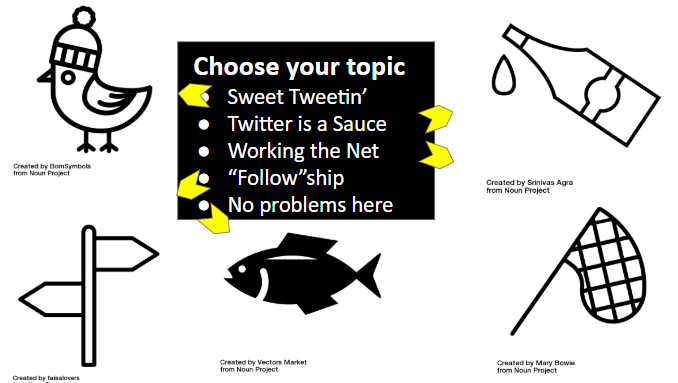
For starters, here are the slides I used. It’s a Choose Your Own Adventure situation here. As I lay this out in blog format, I’m going to have to choose the pathway for us. I hope that’s ok.

choose your topic: sweet tweetin, twitter is a sauce, working the net, followship, no problems here.

I choose to start with “Twitter is a Sauce”.

You have chosen: Twitter is a sauce

What I mean by that is that if your PLN is a stir fry, then Twitter is the teriyaki. The protein and veggies are friendly, shary people, communities, and organizations. It’s also things like podcasts, blogs, sites, courses, conferences, events and more. Twitter helps them stick together and turns them into something tastier and more fulfilling.

We don’t even need to take my word for it. Here in this post by Sarah Wendorf, as part of her work in the Ontario Extend mOOC, are no less than 18 ways, with awesome examples, how she uses Twitter to make that stir fry for your heart and mind. And many of those ways are not for Sarah’s sole benefit. Most of them offer her own expertise and ideas and access to her PLN in service to others. Saucy!

Okay, we are ready for our next path. I choose to go to “Sweet Tweetin’”

You chose Sweet Tweetin'

The Sweet Tweetin’ section is your basic “what exactly can we do with a tweet” 3 minute tutorial on how twitter works. I tried to find a couple of tweets with a lot going on so that we could break it down and see what can happen. I found this one which includes an original tweet with an image and a link, a quote retweet, tagged people, likes, retweets, a reply. This gives us plenty to look at. You can do a lot with a tweet.

A second busy tweet to look at is this one which included a Twitter moment (which represented a conference presentation that was held ON Twitter), some hashtags, another quote retweet and tagged people:

These were just examples of the things you can do. It didn’t hurt that the tweets themselves were about things I hoped were of interest to the attendees to check out, hopefully serving as an example of Twitter being saucy.

I guess now would be a good time to see what the No Problems Here choice is all about. Is that a herring?

You have chosen: No problems here

I hope we survive this pathway.

You Died. The End.
oops.

Go check out slides 9-11 in the slide deck to see what happened there. It’s just a reminder that Twitter is not always sunshine and lollipops. Let’s go back and try again. “Working the Net” next okay with everyone?

You have chosen: Working the net

Working the ‘net’ is seeing what we can do with our PLNs. What can we get out of it? What can we make it do? For starters, we can ask it for help:

I once asked two people in my PLN directly for some Open Education Slide decks to work with. What resulted was this collection of slide decks from about 30 fabulous people and orgs that advocate for Open Education. There are probably 1000+ slides to work with in there. Nice work, PLN!

I also wanted to show how you can offer access to your PLN to others. It will still benefit you to find out what your PLN can come up with for answers to a question posed by a friend. This one just took a quote retweet:

Look through the replies and follow threads and you’ll see that now McMaster has like 30 awesome books to order for their Teaching & Learning unit and that I am now part of a book club with some awesome folks in Oklahoma.

Okay now we have no choice but to head to “Follow”ship. What’s that?

You have chosen: "Follow"ship

“Follow”ship is a short fellowship in following people, in order to kickstart a PLN, right here and right now. I started by going over a few things that I have found via twitter that I treasure. You can check those out in the slide deck.

you'll find things that you treasure.

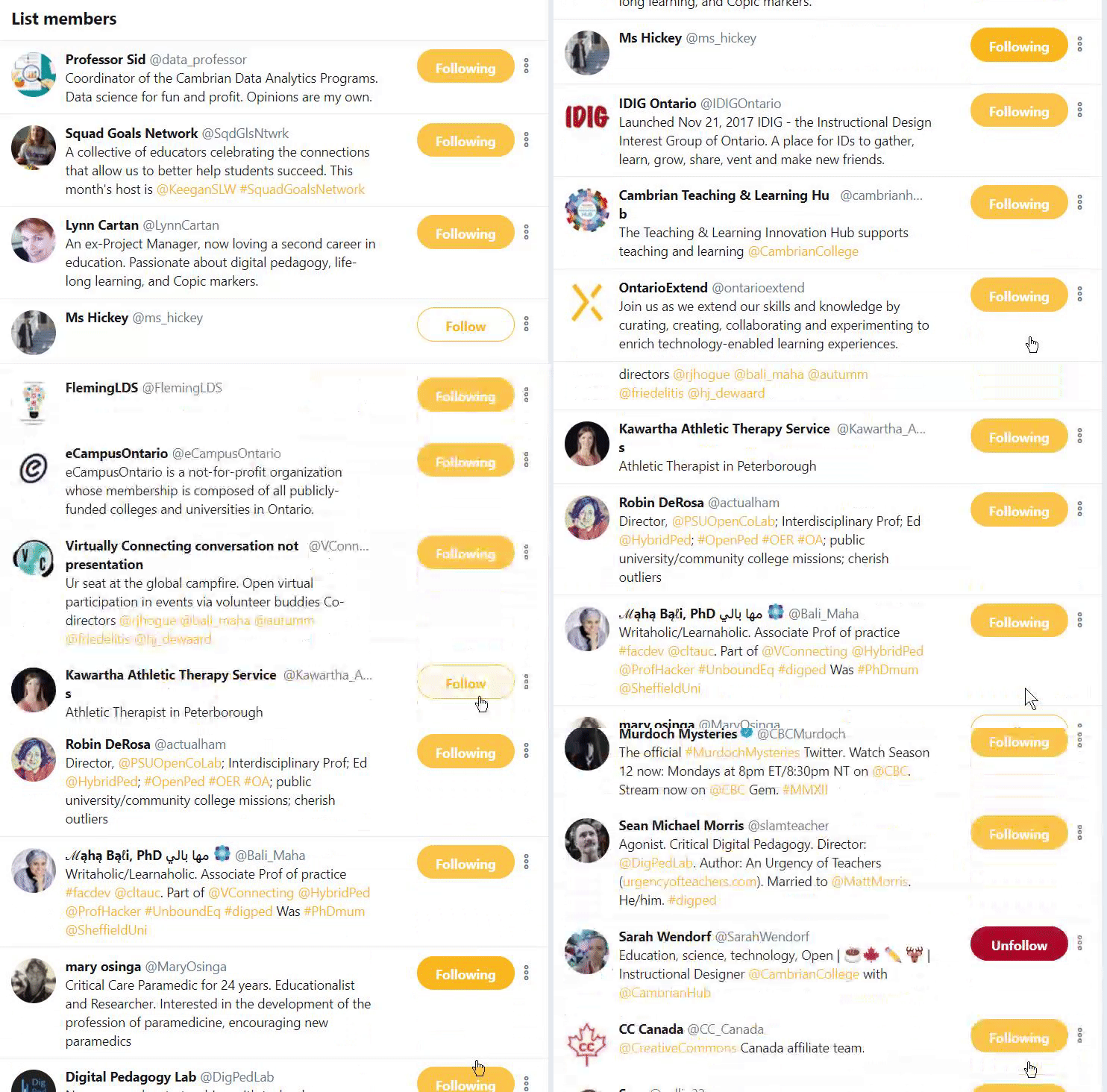
There’s nothing left to do now but make our PLNs grow by attacking this twitter list – PLN Kickstart List – with a whole lot of pressing of the “follow” button. The link takes you to the member list, so you can follow the heck out of everyone on the list that you’d like. DO IT!

click all the follows that you like

The list includes any of those attending the talk in person that I could collect and anyone mentioned in any of the slides. I hope this list amps up a whole whack of networks. You want on the list, too? Ok! Pop your name in here.

I find that the PLN makes the work that we do less lonely, so I hope this talk and this post can serve to help you make some new connections that will work for all of us. I’m happy to connect with you.

Want to go deeper? Do today’s Daily Extend, today’s involves that same PLN Kickstart List and takes it a step or two further.

featured image credit:”Hatch!” flickr photo by chidorian https://flickr.com/photos/chidorian/173712147 shared under a Creative Commons (BY-SA) license

I Got Nowhere But I Went Somewhere at #DigPed Toronto

Last week I had the opportunity to attend the Digital Pedagogy Lab in Toronto. There were five intensive tracks. I chose to go for the Digital Storytelling track led by Chris Friend. I worried maybe I was taking the safe route by choosing a topic I’ve done some work in before. I think I kind of just wanted the chance to jump back on that horse.

When you see other track leads like Martha Burtis, Dave Cormier, Jesse Stommel, Sean Michael Morris and Amy Collier there’s some serious FOMO, even while you’re there. Chris was the most unknown entity of the bunch to me. I’m glad he is unknown no more.

Digital Pedagogy Lab puts us, the participants, very much in the centre of the “what are we going to do while we are together” question. The leads, therefore, cannot know  precisely what we’ll be doing. I imagine it takes a lot of courage to hop on a plane to another country to deliver a three day intensive session and not know exactly what bits of their expertise they will need.

So what did we do? We discussed our story ideas, worked them, focused together on things here and there that seemed to be shared needs or interests, spun our wheels, worked our ideas some more, shared our ongoing progress. In true open pedagogy fashion, Chris began and we built up a shared doc. (I’d share it here, but I am not convinced everyone in the group would okay that. I will update with the link if I can.)

We took some time to chat about what we might want to get out of the stories, what emotion we wanted people to feel, what purpose it would serve. Much of the time Chris spent one-on-one helping guide these stories out. Many digital routes were pursued.

Mine went nowhere.

It was not for lack of effort or anything but my cavalier attitude towards closing my laptop. I came in to the experience completely fascinated by one of the suggested readings, unphased that many of my fellow track members seemed to despise it with a passion. I wanted to do something kind of out there. Something that threw you in to the middle of the story not knowing much about what’s going on. I wanted people to feel “wonder”. My pursuit of wonder was even discussed live online in one of three wonderful Virtually Connecting chats during the event.

My secondment at eCampusOntario ends soon so I wanted my story to be about my experience, for the folks back at Fleming College. I am well aware that there is not enough there for “wonder” to be experienced. I mean, some folks may wonder where I’ve been but “wonder: the emotion” is not really on the table here yet. My shot at that comes from the incredibly enabling opportunities that open education offers. My story was meant to offer rabbit holes to the things/people/experiences that I’ve been lucky enough to work on or near for the last 2 years. Things which I believe have the potential for wonder.

So… it looks I like laid a very simple task out for myself: Provide a bunch of rabbit holes to wonder! I’d been a little bit enthralled lately by the idea of text based adventure games that Sidney Shapiro had been working on with his students, but learning Python was not in the cards just now… So I thought I’d go with a Choose Your Own Adventure format (since I’d recently done okay with the idea in a presentation format.)

Track mate Kendall suggested I try out Twine – an open source tool for telling interactive, non-linear stories? Sounds perfect. And it certainly was, except for their weird to me way of “saving” lol.

I concocted a story that involved a condition known as “Post-Secondment Frazzle” in which one has no recollection of ever being away. As I wander through Fleming College, I run into people I know who had had the same experience who would help me to find out what I’d been up to at eCampusOntario. This would ultimately lead readers to different rabbit holes (hopefully) of open education awesomeness as we worked together to cure my frazzle.

It was coming along, but still very much a work in progress. Not sure if any sense of wonder was imminent or anything. But then at the end of day 2 I closed my laptop without doing whatever Twine needs you to do to save but not call it save.

40+ passages were nuked. So I got nowhere. Back to the drawing board.

But, #DigPed, you definitely took me somewhere. You took me somewhere when Sean Michael Morris’s opening remarks dropped the mic and the gauntlet right from the get-go. You took me somewhere when Rajiv went extra personal, experimental (and fun) with his opening keynote. You took me somewhere when you left us to sit in our work for a while during workshop time. And you pushed me somewhere when Jess Mitchell didn’t let us go easily with the closing keynote.

Put together, it sent me on a path somewhere. And like Jess said, “completion is good for bridges. It’s not good for community.” I’ll be headed that somewhere for a while and I’m glad some of this somewhere is with you and everyone involved in all of this.

photo “ONTARIO-00368 – Colour my World” flickr photo by archer10 (Dennis) 198M Views https://flickr.com/photos/archer10/14656590048 shared under a Creative Commons (BY-SA) license

Google Maps Timeline & Digital Security

I’ve been (slowly) working my way through the 23 Things List, a project on digital literacy from the University of Edinburgh. Thing number 4 was Digital Security. While we include Web Security in a lot of our digital literacy prorams, I’m not a huge WebSec person. It’s not something that I think about or worry about to the extent that ….. does.

Probably because WebSec hasn’t been a huge concern for me, I was surprised by what I found on Google Maps Timeline.

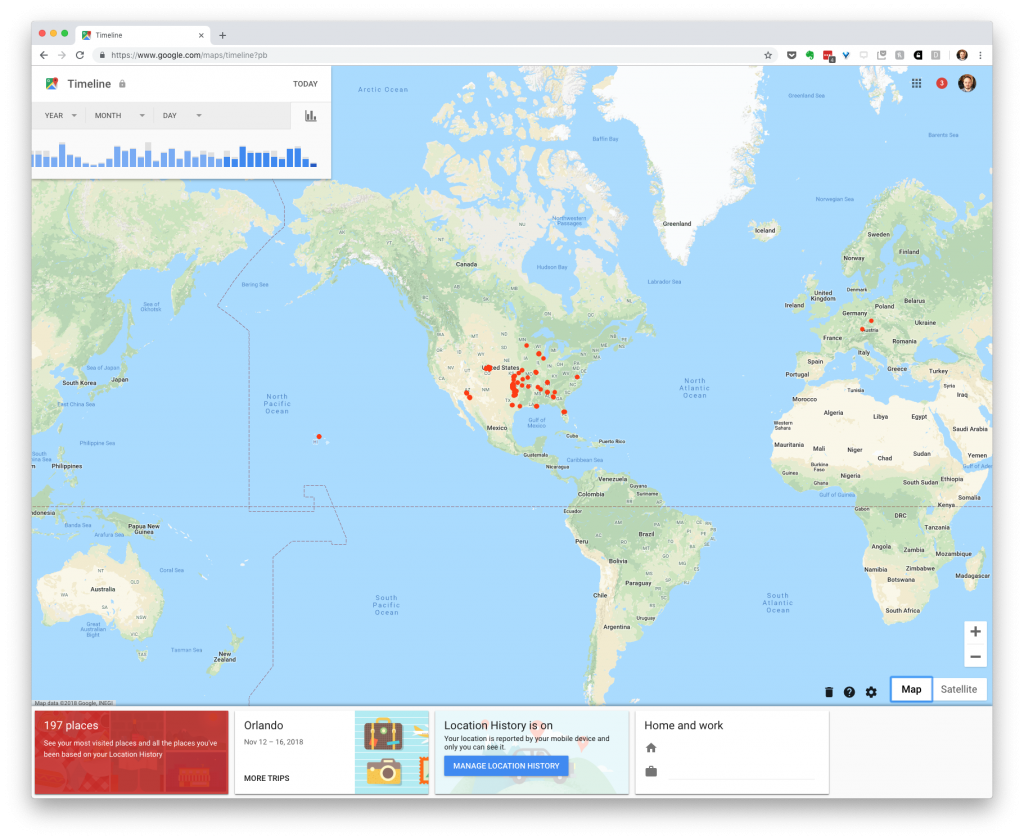
My data on Google Maps Timeline

If you go to https://www.google.com/maps/timeline, you will likely find your own movement history for the past several years. As you can see in the picture above, Google knows my home and work addresses (I’ve removed them from the screenshot), the cities that I’ve been to, and even the modes of transportation I took to get there.

I can go through the data and find out how many times I’ve been to my favorite coffee shops over the past week or year. Google has data on my location dating back to 2009, which is probably when I got my first phone that tracked geolocations. The data is a bit patchy for the early years, but pretty thorough since about 2015.

My colleague Keegan Long-Wheeler has been doing some work on reconstructing his memories from the past few years. He had a brain tumor removed earlier this year, so he has been going back through the softwares that track him to retrace his steps and reflect on his activities.

If we want to be very generous to Google, we can suppose for a moment that this is how they intended such data to be used. I enjoyed spending about 15 minutes looking back through my data and remembering some of the trips from the past couple of years. Google also uses this data to send us notifications about how long it’s going to take to get to work in the morning and what the traffic is like around us. They put our maps through algorithms to understand our daily routines, and build that information into their phones, watches, and assistants.

However, I think we all realize that the reason Google collects this information is so that they can use it for marketing. Google is an ad company and a data company. They want to micro-target us with ads, and they want to sell our data to companies that will be most interested in us. Knowing literally everywhere that I’ve been over the past 10 years is valuable for their business model.

If you haven’t done it yet, go to https://www.google.com/maps/timeline and look at your data. Play around with it for a few minutes. Reminisce about those trips and your favorite spots around town.

Now look at the little black trashcan at the bottom of the screen, and seriously think about deleting all that location data. If you didn’t know about this service until today, and if you don’t care about those notifications you get to your phone, you won’t be missing anything and Google won’t be able to sell all of your location data any more. If you love your Google notifications, and you’ve got a Google Home listening to your every move at home, then maybe leave it on. Either way, control of your data should be up to you. You can find more about your data security in the Thing 4 walkthrough or check out this Medium post by Nick Rosener on Personal Cybersecurity.