As the connected learning coach for the AACU Virginia Faculty Collaboratives Experience, #OpenLearning17, it is my pleasure to wind my way through the open learning hub, focused predominantly on how participants are making connections through their blog posts and tweets. There has been a lot to love in the first two weeks of blog posts. As I mentioned in my greetings and hyperlinking posts, connected learning takes place when learners network their current learning/thinking across disciplines, contexts, people, and time. Digital platforms have unique affordances that allow us to make and reveal our connections. As Autumm’s #openlearning17 post on digital citizens, fake-news, and microtargeting demonstrates, hyperlinking is an amazing way to connect ideas and build infrastructure around a post; if you need additional convincing, check out how she used hyperlinks to define, cite, provide examples, and contextualize.
What do visual elements add?
Hyperlinks are important. However, blogging also allows for the embedding of visual elements (including but not limited to photographs, images, data visualizations, videos, and gifs). Visual elements can enhance the message of a blog post by establishing mood, illustrating points, and extending the narrative. I’ve created an infographic on the topic, but I have also found many wonderful examples among the #openlearning17 blog posts.
Aesthetics. Images can establish or consolidate a mood within a post. Use the same type (meaning color, theme, style etc) of image across multiple blog posts and you can establish a personal brand: a way for your readers to recognize your work in a glance. In #openlearning17, Erin Crane, creator of the Crane Librarian, has established a clean and compelling aesthetic across her blog posts. Check out her most recent post in which the meandering intermingled color flumes in the large centered image match her title, Are We There Yet? perfectly. Camille Freeman has also created an aesthetic around beautiful photographs in her introductory post. Her choice of the partially unfurling plant aligns well with her self-described “tentative toe dip.”
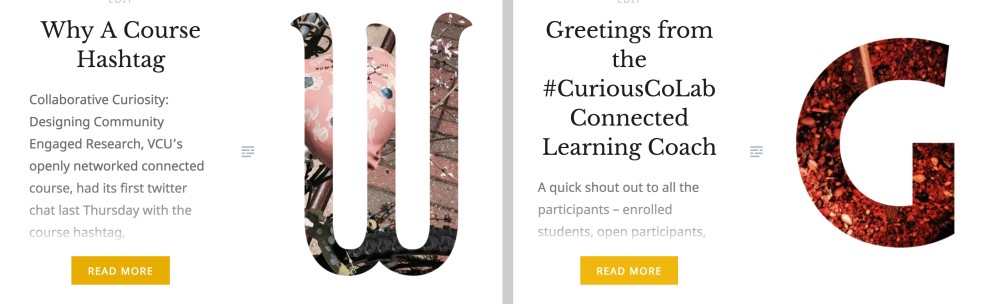
Additionally, check out an example of my own: As the connected learning coach for #CuriousCoLab, I created digital letters from my own photographs to use as featured images for all of my coaching-specific blog posts.

Illustrations. Images, videos, and gifs can help illustrate the point of your post. John Stewart’s post, Open Note Databases and the Promise of the Memex, not only incorporates the relevant #openlearning17 video panel discussion but also offers readers several compelling visual examples from open note databases.
Outside the realm of #openlearning17 (but juxtaposed with it in my Twitter timeline), are the social media hashtag phenomena of #dresslikeawoman and #actuallivingscientist. Take a moment to reflect on how the addition of an image impacts the power of the message.


Extending. Finally, bloggers can integrate images, data visualizations, and videos into the posts so that they extend the narrative of the post beyond the text. In the #openlearning17 hub, check out the way RaptnRent incorporated a song and music video into the post….Making the connection between the song and the week’s readings is the primary theme of the post. Also check out Alan Levine’s post in which he moves seamlessly between text and illustrations – it’s hard to tell where one begins and the other leaves off.
Alternatively, check out my first post on why embedding visual images into blog posts makes an impact, in which I interviewed my eldest daughter who explained everything you need to know over a slice of pizza at the Virginia Museum of Fine Arts. This video basically served as an advanced organizer for the rest of my post.
What about the learning?
With all this talk about using visual elements to express oneself, it might be easy to forget the learning aspects of using embedded images and videos. How does going to all of the extra work to embed non-text based elements into your post contribute to your learning?
Making connections across books, music, maps, photos, charts, and .gifs means making connections across disciplines, contexts, people, and time. Consider that adding visual components takes time: time that is mostly spent on considering what you are trying to say and how you might express it through other avenues. Reflecting on what you are trying to say and considering it in other contexts is always a good thing for learning.
What about the technicalities?
If you need more specific details on how to embed, how to create your own images, or where to go to find CC-licensed or public domain offerings, check out my previous blog post on visuals.
As always, please remember to cite your image sources. Videos that are embedded from Vimeo or YouTube are self-citing…click on them and you automatically go to the original video publishing platform; photos and images are different. You must give credit to the image creator and provide a url somewhere in the post. Caption, hyperlink, integrate it into the post text – just do something! And consider this, I know that CC-0 and public domain images do not technically require citation, but you should consider doing it anyway for reasons of karma and transparency.
Additionally, please add alt text to your images so that it can be read by text readers. A little description is fine, just enough to keep those who use text readers in the loop. It’s a good practice.

